Architecture

How Dev Ramps secures your deployments

Dev Ramps operates as a control plane that orchestrates deployments into your AWS accounts. Your code, infrastructure, and data never pass through our systems.

Security Architecture Diagram

Diagram showing the separation between Dev Ramps control plane and customer AWS accounts:

Left side: "Dev Ramps Control Plane" box containing: Pipeline orchestration, Deployment coordination, Audit logging, User management

Right side: "Your AWS Organization" containing multiple account boxes (Dev Account, Staging Account, Production Account) each with their own VPC, IAM roles, and resources

Arrow between them labeled "IAM AssumeRole (minimal permissions)" showing how Dev Ramps connects to customer accounts

Clear visual boundary emphasizing isolation

IAM and Permissions Model

Dev Ramps uses IAM AssumeRole to access your AWS accounts with the minimum permissions required for deployment operations. You maintain full control over what Dev Ramps can and cannot do.

Least Privilege by Default

The IAM role you grant Dev Ramps is scoped to only the actions needed for deployment. No admin access, no wildcard permissions.

Transparent Permissions

The exact IAM policy is visible during setup. You know exactly what permissions you're granting before you grant them.

No Persistent Credentials

Dev Ramps never stores AWS credentials. Every action uses temporary credentials from STS AssumeRole, automatically rotated.

Revocable Access

Delete the IAM role at any time to immediately revoke all Dev Ramps access. You remain in complete control.

Screenshot

IAM policy viewer showing the exact permissions requested by Dev Ramps during AWS account connection, with clear descriptions of what each permission allows

Diagram

AWS Organization diagram showing account-level isolation: each environment (Dev, Staging, Prod) in separate AWS accounts with isolated VPCs, security groups, and IAM boundaries. Arrows show that cross-environment access is prohibited.

Environment and Account Isolation

Each environment runs in its own AWS account with complete isolation. Development resources cannot access production data, and staging cannot affect production infrastructure.

Account-Level Separation

Dev, staging, and production run in separate AWS accounts. This is the strongest isolation boundary AWS provides.

Network Isolation

Each environment has its own VPC with no default peering. Network traffic cannot flow between environments without explicit configuration.

Data Isolation

Databases, caches, and storage are provisioned per-environment. Production data is never accessible from lower environments.

Secrets Management

Secrets are stored in AWS Secrets Manager within your accounts and injected into services at runtime. Dev Ramps never sees or stores your secrets—they stay in your AWS environment.

AWS Secrets Manager

All secrets are stored in AWS Secrets Manager with encryption at rest using KMS keys you control.

Automatic Rotation

Configure automatic rotation for database credentials and API keys. Dev Ramps handles rotation without downtime.

Audit Trail

All secret access is logged via CloudTrail. Know exactly when and how secrets are accessed.

No Plaintext Secrets

Secrets are never stored in environment variables, config files, or logs. Injected at runtime via secure channels only.
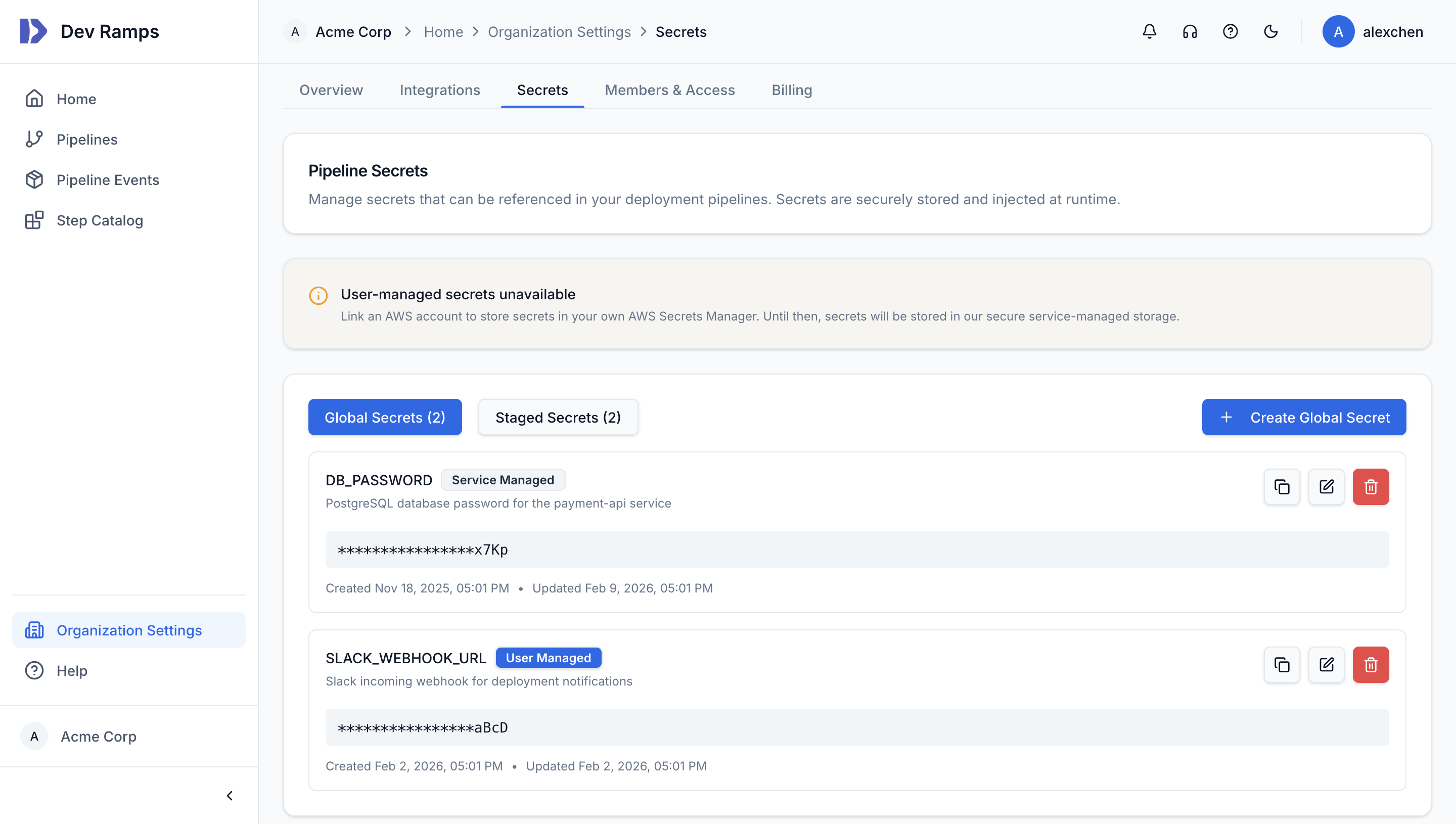
Secrets management UI showing global and staged secrets with masked values
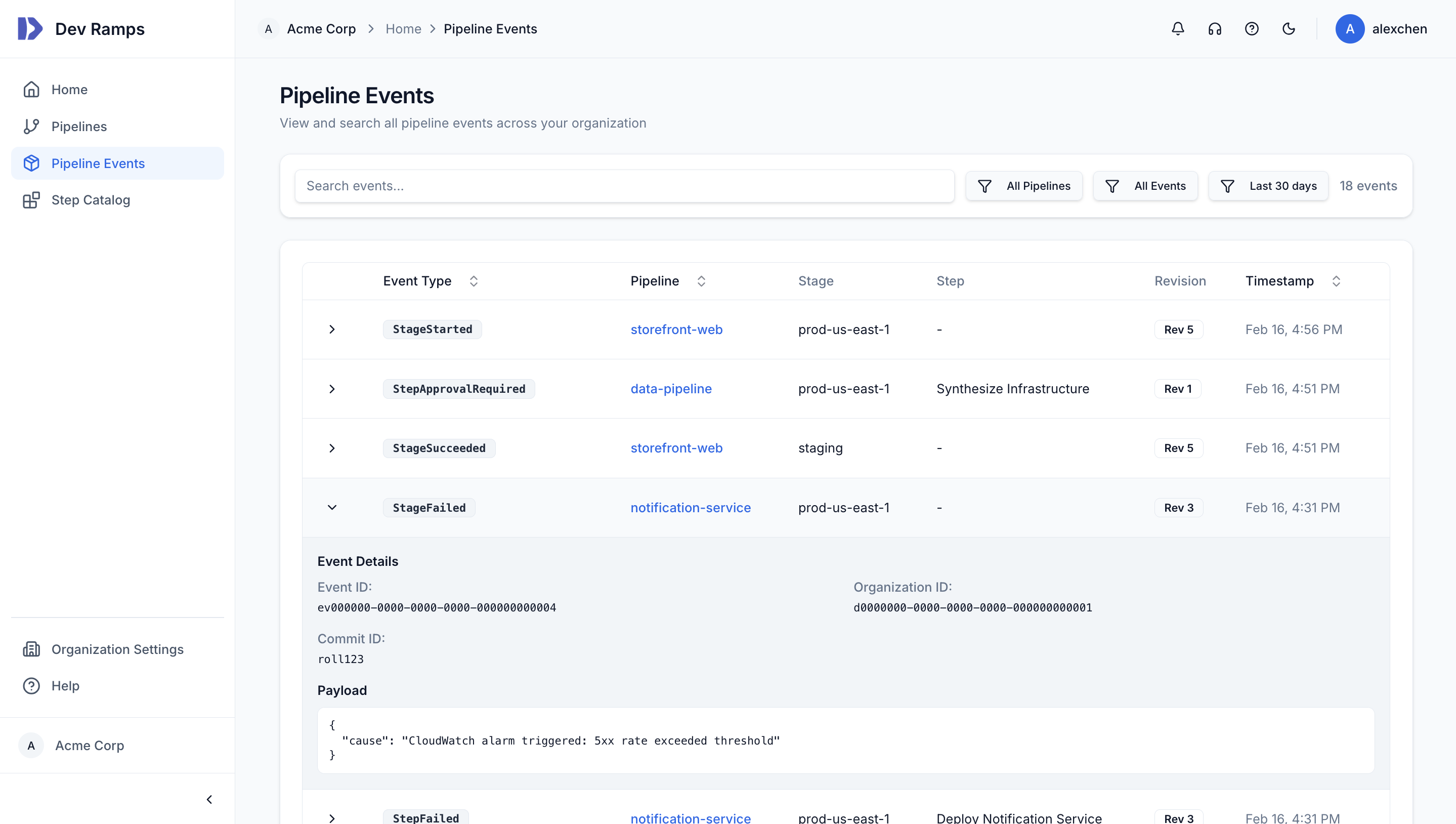
Pipeline events audit log showing deployment events with timestamps, stages, and event details

Audit Logs and Approvals

Every action is logged with full context. Deployments, approvals, configuration changes, and user actions are captured in a tamper-evident audit log that satisfies compliance requirements.

Complete History

Every deployment, every approval, every configuration change is recorded. Answer "who changed what and when" for any resource.

Approval Workflows

Require manual approval before production deployments. Approvers see infrastructure diffs and can approve or reject with comments.

Searchable and Exportable

Search audit logs by date, user, resource, or action type. Export to CSV or integrate with your SIEM.

Retention Policies

Configure log retention to meet your compliance requirements. Enterprise plans support extended retention periods.

Encryption

Data protection at every layer

Encryption in Transit

All communication between Dev Ramps and your AWS accounts uses TLS 1.3. API calls, webhook deliveries, and log streaming are encrypted end-to-end.

Encryption at Rest

Your infrastructure is provisioned with encryption enabled by default. EBS volumes, RDS databases, S3 buckets, and secrets are all encrypted using KMS.

Your Keys, Your Control

Encryption uses KMS keys in your AWS accounts. You control key policies, rotation schedules, and access. Dev Ramps never has access to your encryption keys.

Compliance

Built for regulated environments

Dev Ramps is designed to support teams operating in regulated industries. Our security controls align with common compliance frameworks.

SOC 2 Type II

Dev Ramps is currently pursuing SOC 2 Type II certification. Our controls are designed to meet the Trust Services Criteria for security, availability, and confidentiality.

GDPR Ready

Dev Ramps processes minimal personal data. Your application data stays in your AWS accounts and never passes through our systems. Data processing agreements are available.

HIPAA Eligible

For healthcare organizations, Dev Ramps can be configured to support HIPAA compliance. Business Associate Agreements are available for Enterprise customers.

PCI DSS Support

Dev Ramps supports deployment patterns compliant with PCI DSS requirements, including network segmentation, access controls, and audit logging.

Need to discuss specific compliance requirements?

Contact our security team

Our Practices

How we secure Dev Ramps

Security isn't just a feature—it's how we operate.

Secure Development

All code changes go through security review. We use static analysis, dependency scanning, and automated security testing in our CI pipeline.

Penetration Testing

We conduct regular third-party penetration tests and address findings promptly. Summary reports are available to Enterprise customers upon request.

Incident Response

We have documented incident response procedures and maintain 24/7 on-call coverage. Security incidents are communicated transparently to affected customers.

Employee Security

All employees complete security awareness training. Access to production systems requires hardware security keys and is logged.

Vendor Management

Third-party vendors are evaluated for security before integration. We minimize data shared with vendors and require security commitments.

Responsible Disclosure

We welcome security researchers to report vulnerabilities through our responsible disclosure program. Valid reports are acknowledged and addressed promptly.

Questions about security?

Our security team is available to discuss your specific requirements, answer questions, and provide documentation for your security review.