How It Works
Three steps from zero to production-grade CI/CD on AWS. Define your pipeline, connect your accounts, push code.
Horizontal flow diagram showing the complete journey: Git Push → Build & Test → Deploy to Dev → Deploy to Staging (with bake time) → Approval → Deploy to Production → Monitoring. Include icons for each stage and arrows showing the flow.
Add a devramps.yaml file to your repository. Define your stages (the AWS accounts your code flows through), steps (what happens at each stage), and artifacts (what gets built). No scripting required.
Connect your GitHub repository — Dev Ramps installs a lightweight webhook that watches for pushes. Pushes to your default branch trigger the full pipeline automatically.
version: "1.0.0" pipeline: cloud_provider: AWS pipeline_updates_require_approval: ALWAYS stages: - name: staging account_id: "000000000000" region: us-east-1 - name: production account_id: "111111111111" region: us-west-2 steps: - name: Deploy Service type: DEVRAMPS:ECS:DEPLOY - name: 10 Minute Bake type: DEVRAMPS:APPROVAL:BAKE params: duration_minutes: 10 artifacts: API Image: type: DEVRAMPS:DOCKER:BUILD params: dockerfile: /Dockerfile
Run npx @devramps/cli bootstrap to set up least-privilege IAM roles in your AWS accounts. The CLI creates OIDC-based trust relationships — no persistent credentials, no manual CloudFormation. One command per account and you're done.
Each environment runs in its own AWS account with isolated IAM boundaries. Dev Ramps handles cross-account orchestration so your team doesn't need to manage IAM roles or trust policies manually.
Terminal showing the CLI bootstrap flow: npx @devramps/cli bootstrap command, AWS account selection, IAM role creation output with least-privilege policy summary, and success confirmation.
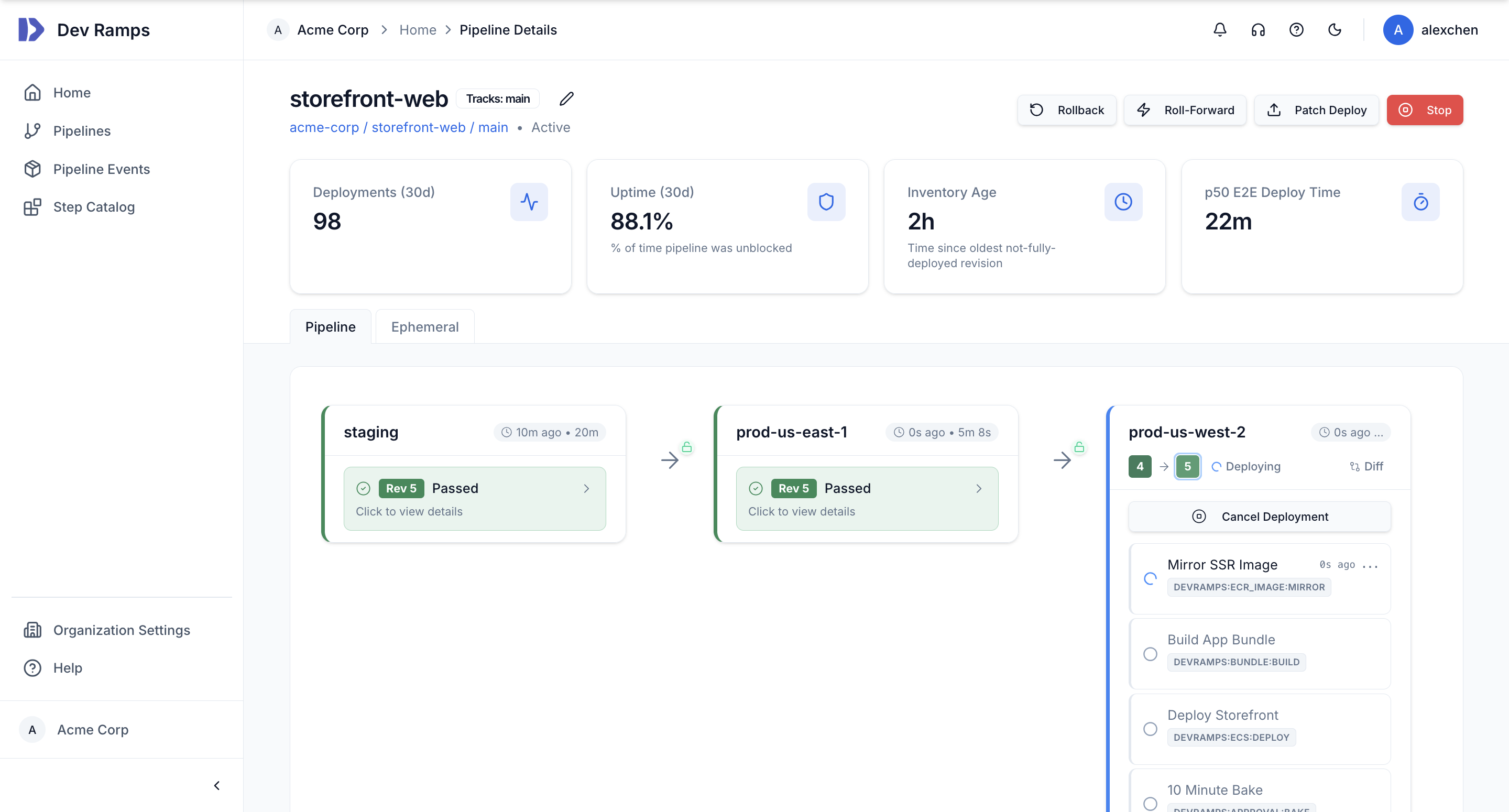
Push to your repository and watch your code flow through build, test, and deployment stages across AWS accounts. Artifacts are built, Terraform is applied, services are deployed, and bake periods are observed — all orchestrated automatically.
Approvals, rollbacks, deployment time windows, and CloudWatch alarm-triggered auto-rollback are all handled for you. Access real-time logs, view deployment history, and maintain a complete audit trail of every change.
Built-in Safety
Every deployment includes enterprise-grade safety mechanisms — no extra setup required.
Review Terraform plan diffs before applying. Approve deployments to production with full context — commit history, infrastructure changes, and previous environment health.
CloudWatch alarm-triggered automatic rollback with stage blocking. If your alarms fire during a bake period, Dev Ramps rolls back and halts the pipeline.
Block deployments during off-hours or sensitive periods. Configure deployment time windows per stage to ensure production changes only happen when your team is available.
AI Agent Integration
Define ephemeral environments in your pipeline YAML and AI coding agents can autonomously deploy, verify, and iterate on changes against real AWS infrastructure.
Add an ephemeral_environments block to your pipeline definition. Each environment maps to an isolated AWS account that agents can claim on demand.
When an AI agent needs to test its changes, it claims an environment, deploys a commit, and monitors the full pipeline — Terraform, container builds, service deployments, and health checks. The agent reads real-time logs and step status to verify success, then either iterates or releases the environment.
Approval gates are automatically skipped for ephemeral deployments, so agents aren't blocked by human-in-the-loop steps. Session-based locking prevents contention when multiple agents or developers share the same pipeline.
pipeline: stages: - name: staging account_id: "000000000000" region: us-east-1 - name: production account_id: "111111111111" region: us-west-2 # Ephemeral envs for AI agents & PR previews ephemeral_environments: agent-env: account_id: "222222222222" region: us-east-1 pr-preview: account_id: "222222222222" region: us-east-1
Under the Hood
You focus on your application. We handle the platform complexity.
Our CLI sets up least-privilege IAM roles across your existing AWS accounts via OIDC — no persistent credentials, no manual CloudFormation. One command per account.
Dev Ramps synthesizes and applies your Terraform configurations across accounts, with plan review and approval gates. Infrastructure changes are tracked and diffed.
ECS, EKS, CodeDeploy, and S3 deployments with rollbacks, bake periods, and health check gates. We orchestrate complex multi-step deployments so you don't have to.
Secrets are stored in AWS Secrets Manager in your accounts and injected at runtime. Dev Ramps never sees your secrets — they stay in your AWS environment.
When deployments fail, AI reads your logs and source code, identifies root cause, and can auto-generate a fix PR. Unblock your team faster.
Track P50 deploy time, % time blocked, and inventory age. See which pipelines are slowing your team down and identify bottlenecks.
Ephemeral, session-locked AWS environments that AI coding agents claim on demand. Full pipeline execution with automatic approval bypass so agents aren't blocked.
Getting Started
No credit card required. Connect a repository, add a config file, and ship.
Create your account and authorize Dev Ramps to access your GitHub organization. No agents or complex setup required.
Run npx @devramps/cli bootstrap to set up least-privilege IAM roles in your accounts. One command, no manual CloudFormation.
Add a devramps.yaml to your repo and push. Watch your first deployment flow from commit to running service.
Production-grade AWS deployments in minutes, not months. First deployment in under 15 minutes.